
Polarr
Polarrcan
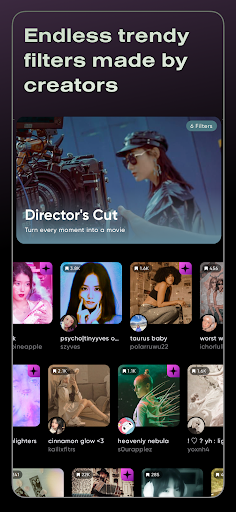

Endless aesthetics and effects

About Polarr
Polarr APK is a professional-grade photo editing application designed for mobile users who want full creative control over their images. With a strong focus on filters, color grading, and AI-powered tools, Polarr has become a popular choice among photographers, content creators, and social media enthusiasts around the world.
Unlike many basic photo editors, Polarr APK offers a flexible and advanced editing environment while still remaining accessible to beginners. Whether you want to enhance everyday photos or create artistic visuals with a distinct style, Polarr provides the tools needed to bring your ideas to life.
Introduction to Polarr APK
A mobile photo editor built around filters and creativity
Polarr APK stands out as a mobile photo editing app that places filters at the center of the creative experience. Instead of relying only on basic brightness and contrast adjustments, Polarr introduces a vast ecosystem of styles contributed by a global community of designers, known as Polarr Creators.
These styles are not static presets. Each filter can be adjusted, customized, and combined with other tools, allowing users to develop a unique visual identity across photos and even videos.
What Can You Do with Polarr APK?
Professional-level editing tools on your smartphone
At its core, Polarr APK offers all the essential photo editing tools expected from a modern application. Users can adjust exposure, highlights, shadows, contrast, clarity, and color balance with precision. The interface is designed to feel intuitive while still supporting advanced workflows.
Beyond basic adjustments, Polarr encourages experimentation. Users can freely layer effects, fine-tune colors, and explore creative compositions without feeling limited by predefined templates.
A massive collection of community-driven filters
One of the most impressive aspects of Polarr APK is its filter library. The app includes hundreds of built-in styles and thousands of user-created filters shared by the global Polarr community.
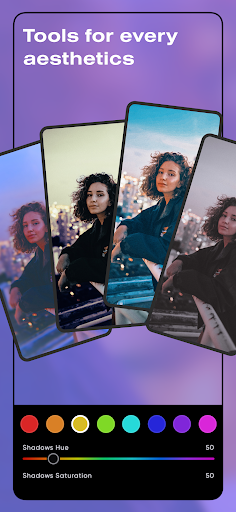
From vintage film looks and soft pastel tones to modern cyberpunk aesthetics and cinematic color grading, Polarr APK covers a wide range of artistic directions. Users can easily browse, apply, and tweak filters to match their personal taste.
Each filter includes intensity controls, allowing subtle enhancements or bold transformations depending on the desired outcome.
AI-Powered Editing for Natural Results
Smart photo enhancement with advanced AI technology
Polarr APK integrates advanced AI algorithms to handle complex editing tasks that are difficult to achieve manually. For example, the app can automatically detect the sky in an image and apply enhancements such as richer blues, dramatic clouds, or sunset tones while maintaining realistic transitions.
The AI system works seamlessly in the background, identifying different areas of the image and applying changes in a natural and balanced way.
Face retouching that preserves natural features
Another standout AI feature in Polarr APK is face recognition and retouching. The app can detect facial features and provide tools to smooth skin, reduce blemishes, adjust facial structure, and enhance details while keeping the subject’s natural appearance intact.
Rather than creating an artificial or over-processed look, Polarr focuses on subtle improvements that enhance confidence without losing individuality.
Overlay and Mask Tools for Advanced Editing
Full control over composition and visual layers
Polarr APK offers a powerful overlay system that allows users to adjust the overall composition of their images. Overlays can include gradients, textures, lighting effects, weather elements, and custom layers that add depth and atmosphere.
These tools are especially useful for users who want to create artistic or editorial-style photos directly on their mobile devices.
Precision editing with masking tools
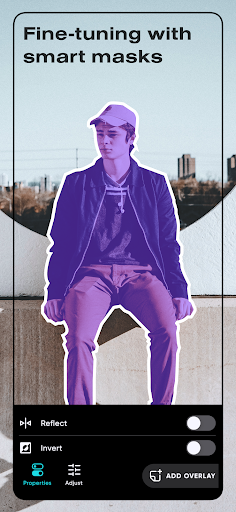
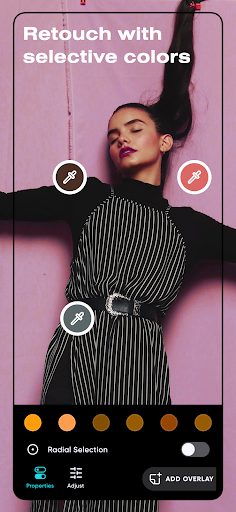
To support detailed adjustments, Polarr APK includes multiple masking options such as Brush, Radial, Gradient, Color, and Luminance masks. These tools allow users to target specific areas of an image and apply edits selectively.
With masking, you can enhance the subject without affecting the background, adjust lighting in certain zones, or create complex visual effects with high accuracy.
Polarr Styles and Cross-Device Synchronization
Regularly updated styles for modern aesthetics
Polarr Styles are updated weekly to reflect current visual trends and creative directions. These styles are designed to suit a wide range of themes, including portraits, landscapes, architecture, and lifestyle photography.
Users can also create and share their own styles, building a personal collection that can be reused across different projects.
Sync styles across multiple devices
Polarr APK allows users to synchronize styles through a Polarr account. This means your custom filters and preferences can be accessed on multiple devices, ensuring a consistent editing experience wherever you work.
Polarr Subscription Options
Unlocking the full creative potential
While Polarr APK offers a strong set of free features, users who require access to premium styles and advanced tools can choose from flexible subscription plans. These plans are designed for users who want to explore the full depth of Polarr’s creative ecosystem.
Premium access provides expanded style libraries, advanced AI tools, and high-detail editing options suitable for professional and long-term use.
Why Polarr APK Is Worth Exploring
Polarr APK is more than just a photo editing app. It is a creative platform that combines powerful tools, community-driven content, and intelligent AI features into a single mobile experience.
Whether you are editing photos for personal memories, social media content, or professional projects, Polarr offers the flexibility and depth needed to produce visually compelling results. Its focus on creativity, customization, and natural-looking edits makes it a strong choice for users who want more than basic photo adjustments.